

Description
Download Wunderlist – to-do list, task management, productivity tool
Overview
Wunderlist is a cross-platform productivity tool designed to help users capture, organize, and manage tasks across multiple devices. It serves as a versatile to-do list application that supports personal planning, family coordination, and collaborative project management. Whether it’s tracking grocery items, scheduling work assignments, or organizing vacation itineraries, Wunderlist enables seamless task tracking with real-time sync across smartphones, tablets, and desktops.
The software is tailored for individuals and teams seeking a straightforward yet powerful way to stay on top of responsibilities. Its intuitive interface makes it accessible to both casual users and professionals who rely on structured task systems. Wunderlist has been recognized by major publications such as The Verge, The New York Times, and Wired, underscoring its reputation as a reliable and user-friendly productivity solution.
Although the developer did not provide additional background details, Wunderlist’s widespread adoption and integration with multiple platforms suggest a mature, well-maintained application. It is particularly effective in scenarios requiring shared access to tasks, such as household chore distribution, team project workflows, or collaborative event planning.
Key Features & Capabilities
- Multi-Device Sync – Access your lists instantly from Windows, Mac, iOS, and Android devices, ensuring continuity across personal and professional environments.
- Collaborative List Sharing – Share tasks with family, friends, or colleagues and assign specific to-dos to individuals, promoting accountability and teamwork.
- Task Conversations – Initiate discussions directly within tasks to clarify details, provide updates, or exchange ideas without switching apps.
- File Attachments – Attach photos, PDFs, presentations, and other documents to tasks, enhancing context and supporting detailed project execution.
- Reminders & Notifications – Set reminders to ensure important deadlines, birthdays, or recurring tasks are never missed.
- Folder Organization – Group related lists into folders for better structure, ideal for managing multiple projects at home, work, or in personal life.
- Subtasks & Assignments – Break down complex tasks into smaller steps and delegate them to team members, improving workflow clarity and efficiency.
These features collectively support a dynamic workflow, especially in environments where collaboration and time-sensitive actions are critical. For example, a team planning a marketing campaign can create a shared list, assign subtasks to designers and copywriters, attach brand guidelines, and set reminders for deliverables—all within one unified interface.
User Interface, Workflow & Performance
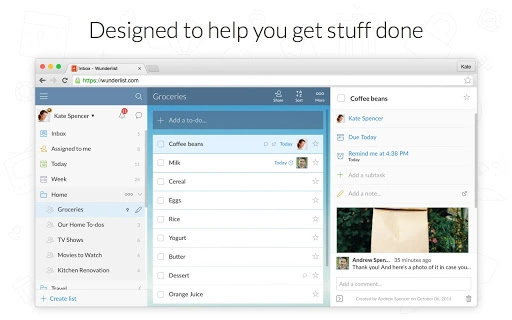
Wunderlist features a clean, minimalist user interface that prioritizes readability and ease of navigation. Tasks are displayed in a scrollable list format with clear visual indicators for completion status, due dates, and assigned users. The layout is consistent across platforms, ensuring a familiar experience whether using a desktop or mobile device.
Navigation is straightforward, with a sidebar for accessing folders and lists, and a central panel for viewing and editing tasks. Users can quickly add new items, mark them as complete, or set reminders with minimal clicks. The workflow supports rapid input, making it ideal for capturing ideas on the go.
Performance observations are based on general software behavior patterns. The application maintains responsiveness during routine use, with sync operations appearing seamless across devices. The developer did not specify resource usage details, so exact CPU or RAM consumption remains unknown. Stability is presumed to be high given the software’s long-standing presence and regular updates.
Compatibility & System Requirements
Wunderlist is compatible with Windows, Mac, iOS, and Android operating systems. The current version, 2.2.1, has a download size of 25.3 MB, making it lightweight and suitable for devices with limited storage. Installation is straightforward, with no complex setup steps required.
Exact system requirements were not listed. However, based on its cross-platform availability and lightweight footprint, it is likely optimized for modern devices with standard processing power and memory. Compatibility information was partially provided, indicating broad support across major desktop and mobile platforms.
Pros and Cons
Pros
- Seamless cross-platform synchronization between devices
- Intuitive interface suitable for users of all experience levels
- Robust collaboration features including task assignment and shared conversations
- Supports file attachments and reminders for enhanced task clarity
- Free to download and use with optional Pro upgrade for advanced features
- Consistent design and functionality across Windows, Mac, iOS, and Android
Cons
- Advanced features like subtasks and file attachments require a paid Pro subscription
- Developer did not provide detailed system requirements or performance metrics
- Offline functionality may be limited, though not explicitly stated
- Some users may find the free version insufficient for complex project management
- Integration with third-party calendar apps is not detailed in available information
FAQ Section
Is Wunderlist available for Windows and Mac?
Yes, Wunderlist supports both Windows and Mac operating systems, allowing users to access their tasks across desktop platforms.
Can I use Wunderlist offline?
While the application supports offline access to some extent, specific details about offline functionality were not provided by the developer.
Is Wunderlist safe to download and use?
Wunderlist is a trusted productivity tool with established privacy and security practices. Users are encouraged to review the official Privacy Policy and Terms of Use for detailed information.
How often does Wunderlist update?
Wunderlist receives regular updates to improve performance, fix bugs, and introduce new features. The latest version, 2.2.1, was released on September 22, 2023.
What is the difference between the free and Pro versions?
The free version offers core task management features. The Pro version, available through an in-app purchase, unlocks unlimited file attachments, subtasks, and task assignments for enhanced collaboration and productivity.
Final Thoughts + CTA
Wunderlist stands out as a reliable, feature-rich to-do list application that excels in task organization and team collaboration. Its ability to sync seamlessly across devices and support real-time communication within tasks makes it a strong choice for both personal and professional use. While advanced features are locked behind a subscription, the free version remains highly functional for everyday users.
For individuals managing multiple projects, families coordinating household duties, or small teams handling shared workloads, Wunderlist delivers a polished, efficient experience. Its clean design, intuitive workflow, and cross-platform availability reinforce its status as a top-tier productivity tool.
Download Wunderlist now and take control of your tasks, projects, and priorities with a powerful, accessible solution.
Guides & Tutorials for Wunderlist - To-do and Task list App for Chrome
How to install Wunderlist - To-do and Task list App for Chrome
- Click the Preview / Download button above.
- Once redirected, accept the terms and click Install.
- Wait for the Wunderlist - To-do and Task list App for Chrome download to finish on your device.
How to use Wunderlist - To-do and Task list App for Chrome
This software is primarily used for its core features described above. Open the app after installation to explore its capabilities.
User Reviews for Wunderlist - To-do and Task list App for Chrome 0
No reviews found





